Skip to content
Trending News: What Is a Desktop, Laptop, and Tablet? Key Differences ExplainedHow to Back Up Important Files So You Never Lose ThemWhat Is a PDF File and How to Create One for FreeHow to Zoom In and Zoom Out on Any Screen or Document Like a Pro (Easy Guide 2026)Powerful Method: Frozen PC Ko Task Manager Se 1 Minute Mein Unfreeze KareinHow to Print a Document from Your Computer: A Simple GuideComplete Free Software Guide for Windows 2026: Best Tools for Work, Editing & SecurityTop 10 Free Websites to Learn Basic Computer Skills OnlineComputer Skills Checklist: Are You Ready for an Office Job?What Is Cloud Storage and How to Use Google Drive for FreeHow to Update Windows and Keep Your Computer SecureHow to Connect Your Laptop Screen Like a Pro (Complete Big Screen Setup Guide)How to Protect Your Computer from Viruses – Beginner’s Safety GuideMicrosoft Word for Beginners: The Ultimate Step-by-Step Mastery GuideHow to Delete Browser History and Clear Your Cache Easily“How to Undo Mistakes on Your Computer Using Ctrl+Z (Step-by-Step Guide)”Learn Basic Computer Skills at Home – Free Guide for BeginnersHow to Create a Strong Password and Keep Your Account SafeHow to Take a Screenshot on Windows: Easy Methods ExplainedHow to Download Install Software Safely on Your ComputerBasic Computer Skills for Beginners: The Ultimate Step-by-Step Guide to Master Your PC Fast
Sun. Apr 19th, 2026
techease101.in
  • Basic Computer Skills
  • Email Tips
  • Cloud Storage
  • Tech Vocabulary
  • Device Setup
  • Or check our Popular Categories...
    adjust screen brightness and soundantivirus tips for beginnersBackup important filesbasic computer skillsbasic computer skills 2026basic computer skills for beginnersbasic computer skills for jobsbasic computer skills guidebest device for students laptop or tablet
Trending News: What Is a Desktop, Laptop, and Tablet? Key Differences ExplainedHow to Back Up Important Files So You Never Lose ThemWhat Is a PDF File and How to Create One for FreeHow to Zoom In and Zoom Out on Any Screen or Document Like a Pro (Easy Guide 2026)Powerful Method: Frozen PC Ko Task Manager Se 1 Minute Mein Unfreeze KareinHow to Print a Document from Your Computer: A Simple GuideComplete Free Software Guide for Windows 2026: Best Tools for Work, Editing & SecurityTop 10 Free Websites to Learn Basic Computer Skills OnlineComputer Skills Checklist: Are You Ready for an Office Job?What Is Cloud Storage and How to Use Google Drive for FreeHow to Update Windows and Keep Your Computer SecureHow to Connect Your Laptop Screen Like a Pro (Complete Big Screen Setup Guide)How to Protect Your Computer from Viruses – Beginner’s Safety GuideMicrosoft Word for Beginners: The Ultimate Step-by-Step Mastery GuideHow to Delete Browser History and Clear Your Cache Easily“How to Undo Mistakes on Your Computer Using Ctrl+Z (Step-by-Step Guide)”Learn Basic Computer Skills at Home – Free Guide for BeginnersHow to Create a Strong Password and Keep Your Account SafeHow to Take a Screenshot on Windows: Easy Methods ExplainedHow to Download Install Software Safely on Your ComputerBasic Computer Skills for Beginners: The Ultimate Step-by-Step Guide to Master Your PC Fast
Sun. Apr 19th, 2026
  • Basic Computer Skills
  • Email Tips
  • Cloud Storage
  • Tech Vocabulary
  • Device Setup
techease101.in
  • Or check our Popular Categories...
    adjust screen brightness and soundantivirus tips for beginnersBackup important filesbasic computer skillsbasic computer skills 2026basic computer skills for beginnersbasic computer skills for jobsbasic computer skills guidebest device for students laptop or tablet
  1. Home
  2. Powerful Method: Frozen PC Ko Task Manager Se 1 Minute Mein Unfreeze Karein
Powerful Method: Frozen PC Ko Task Manager Se 1 Minute Mein Unfreeze Karein
  • vikram@gmail.comvikram@gmail.com
  • Basic Computer Skills
  • April 15, 2026
  • 8 views
Powerful Method: Frozen PC Ko Task Manager Se 1 Minute Mein Unfreeze Karein

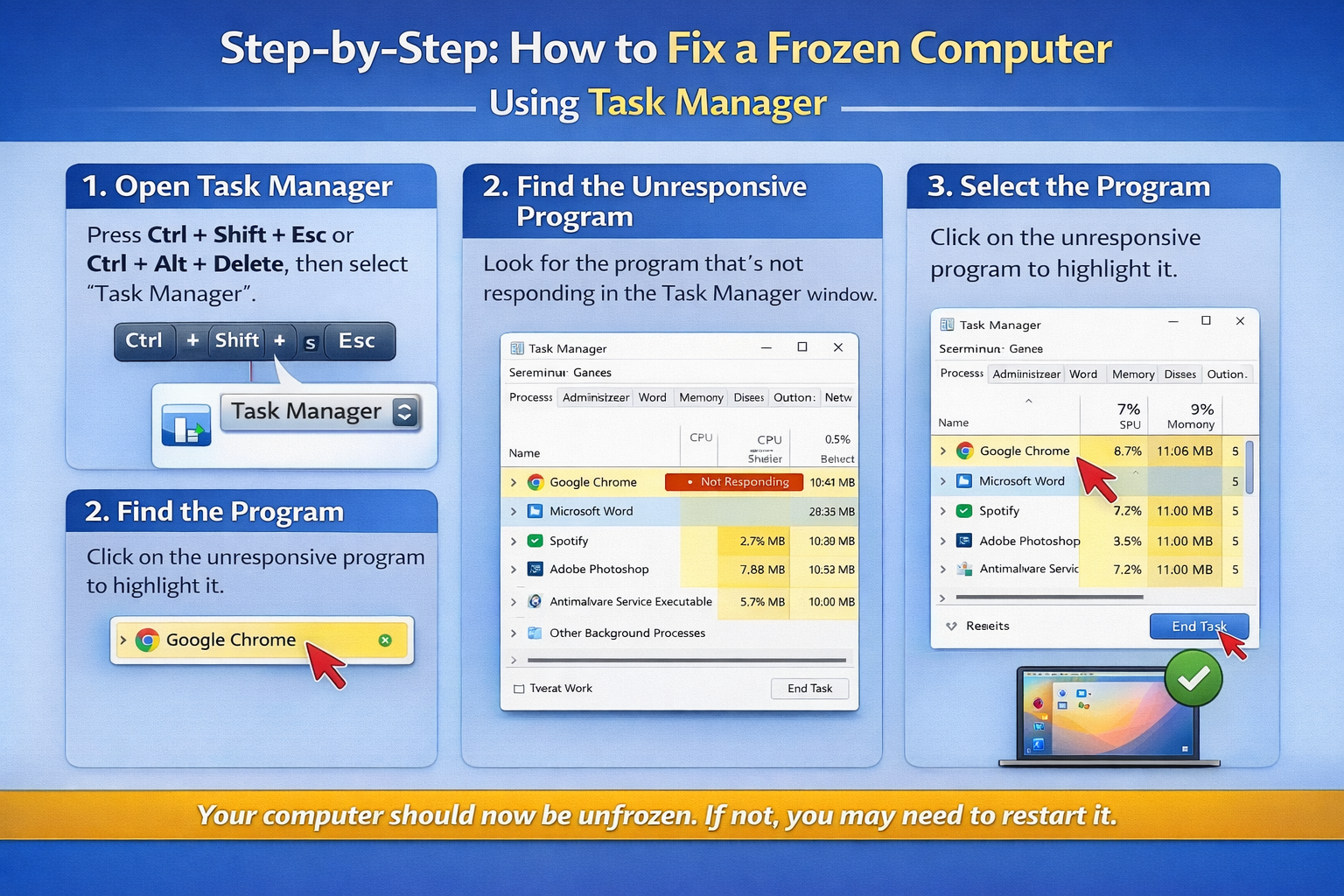
INTRODUCTION:- When your computer suddenly freezes, panic sets in. The screen is unresponsive, the mouse won’t move, and nothing seems to work. But before you reach for that power button…
Continue reading

Recent Posts

  • Desktop
    What Is a Desktop, Laptop, and Tablet? Key Differences Explained
  • Back Up Important Files
    How to Back Up Important Files So You Never Lose Them
  • PDF File
    What Is a PDF File and How to Create One for Free
  • Zoom In
    How to Zoom In and Zoom Out on Any Screen or Document Like a Pro (Easy Guide 2026)
  • Task Manager
    Powerful Method: Frozen PC Ko Task Manager Se 1 Minute Mein Unfreeze Karein

Category

  • Basic Computer Skills
  • Uncategorized

Recent Comments

No comments to show.

You Missed

Basic Computer Skills

What Is a Desktop, Laptop, and Tablet? Key Differences Explained

  • By vikram@gmail.com
  • April 18, 2026
  • 2 views
What Is a Desktop, Laptop, and Tablet? Key Differences Explained
Uncategorized

How to Back Up Important Files So You Never Lose Them

  • By vikram@gmail.com
  • April 17, 2026
  • 7 views
How to Back Up Important Files So You Never Lose Them
Basic Computer Skills

What Is a PDF File and How to Create One for Free

  • By vikram@gmail.com
  • April 16, 2026
  • 5 views
What Is a PDF File and How to Create One for Free
Basic Computer Skills

How to Zoom In and Zoom Out on Any Screen or Document Like a Pro (Easy Guide 2026)

  • By vikram@gmail.com
  • April 16, 2026
  • 4 views
How to Zoom In and Zoom Out on Any Screen or Document Like a Pro (Easy Guide 2026)
Basic Computer Skills

Powerful Method: Frozen PC Ko Task Manager Se 1 Minute Mein Unfreeze Karein

  • By vikram@gmail.com
  • April 15, 2026
  • 8 views
Powerful Method: Frozen PC Ko Task Manager Se 1 Minute Mein Unfreeze Karein
Basic Computer Skills

How to Print a Document from Your Computer: A Simple Guide

  • By vikram@gmail.com
  • April 15, 2026
  • 8 views
How to Print a Document from Your Computer: A Simple Guide


I am Vikram, the creator of Techease101.in, where I share simple and practical tech tips for beginners. My goal is to make technology easy to understand for everyone, even if you’re just starting out. From basic tutorials to useful tricks, I cover topics that help you improve your digital skills step by step. Techease101.in is your go-to place for learning tech in a clear, beginner-friendly, and hassle-free way.

Legal

  • About Us
  • Contact Us
  • Disclaimer
  • Privacy Policy
  • Terms & Conditions

Category

  • Basic Computer Skills
  • Uncategorized
Copyright © 2026 techease101.in | All rights reserved.