 vikram@gmail.com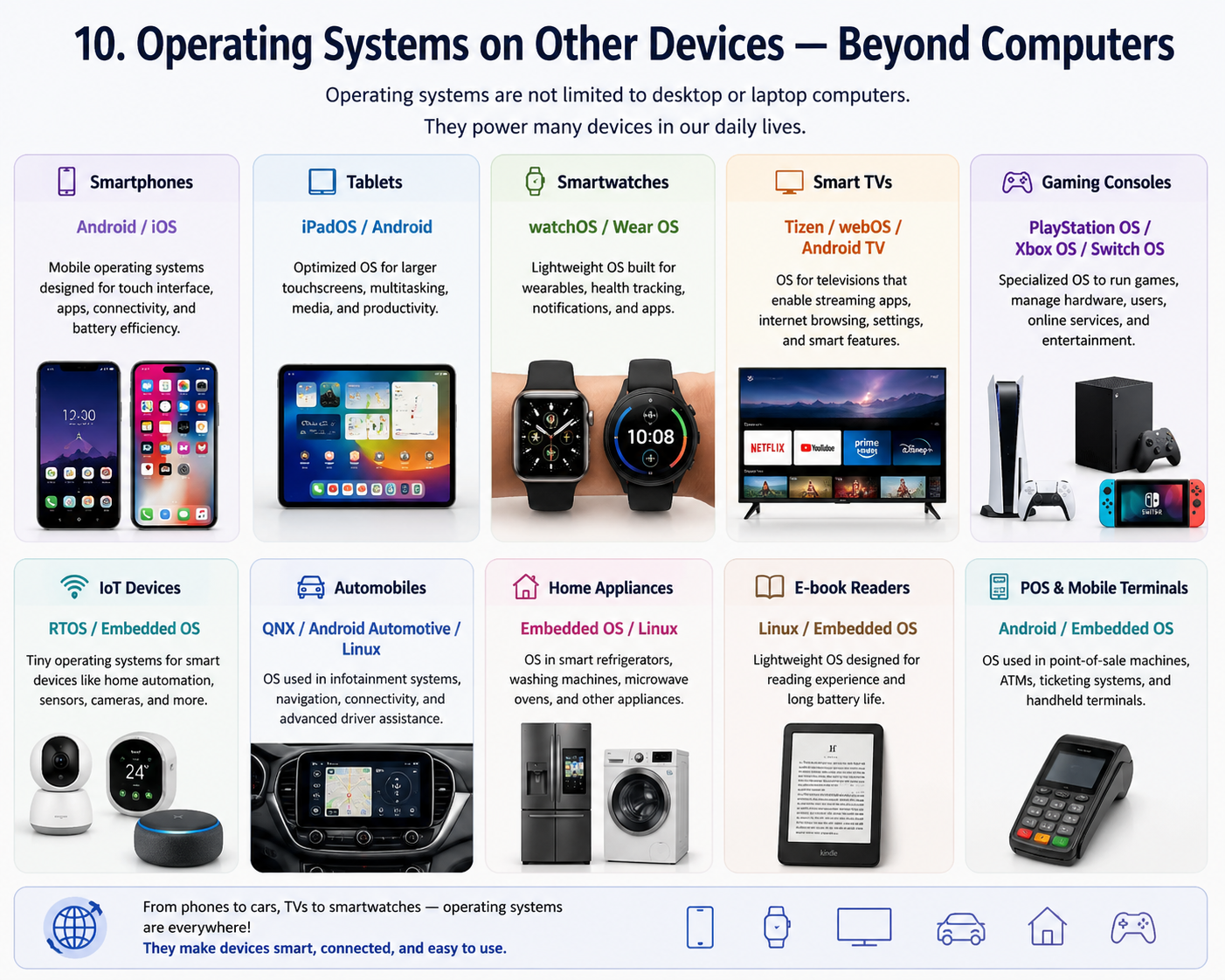
Introduction: The Question Everyone Has But Never Asks
You use a computer every single day. You open apps, browse the internet, watch videos, type documents, and send emails. But have you ever stopped and wondered — what is actually running all of this behind the scenes? The answer is an Operating System. And understanding What is an Operating System is the foundation of understanding how every computer, smartphone, and tablet in the world actually works.
Every year, millions of people type into Google: What is an Operating System — and it is easy to understand why. When you go to buy a new laptop, the sales person asks: do you want Windows or Mac? And most people just shrug. They do not know the difference. They do not know what makes each one unique, which one is right for them, or what an operating system even does.
This guide is going to change all of that. By the time you finish reading, you will know exactly What is an Operating System, how Windows and macOS differ from each other, which one suits your lifestyle, and everything in between — explained in plain, simple English that anyone can understand.
1. What Is an Operating System? — The Simple Answer
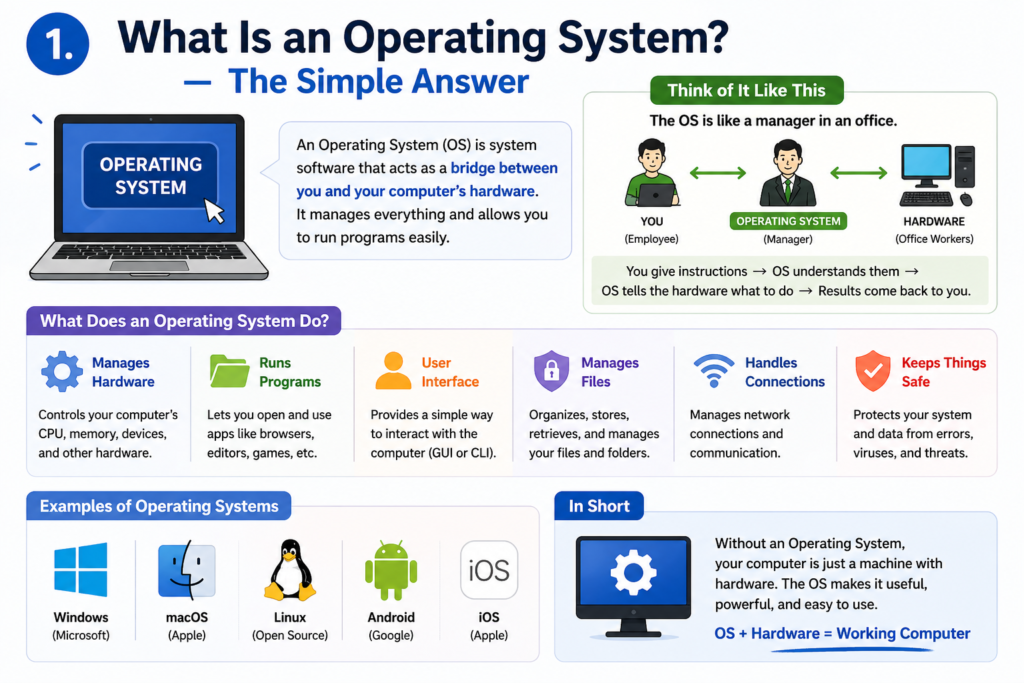
Let us start from the very beginning. What is an Operating System is one of the most important concepts in all of technology, yet most people have never been properly taught what it means.
An Operating System (OS) is the master software that controls everything on your computer. It is the bridge between you — the human — and the hardware inside the machine. Without an operating system, your computer is just an expensive collection of plastic, metal, and chips that does absolutely nothing.
| The Best Simple Definition Think of your computer as a restaurant. The hardware — processor, RAM, hard drive — is the kitchen and all the cooking equipment. The Operating System is the restaurant manager who organizes the kitchen, assigns tasks to the chefs, takes orders from customers, and makes sure everything runs smoothly. Without the manager, the kitchen is just a room full of equipment. |
So when someone asks What is an Operating System, the honest answer is: it is the software that makes your computer usable. It manages your files, runs your apps, controls your screen, handles your keyboard and mouse, connects to the internet, and coordinates every single task your computer performs — all at the same time.
2. What Does an Operating System Actually Do?
Now that you understand the basic answer to What is an Operating System, let us go one level deeper. An operating system has several critical jobs that it handles constantly, every second you use your computer:
| OS Function | What It Means in Simple Terms |
| Process Management | Runs multiple apps at the same time without crashing |
| Memory Management | Decides how much RAM each app gets to use |
| File Management | Organizes your files and folders on the hard drive |
| Device Management | Makes your keyboard, mouse, printer, and USB devices work |
| Security Management | Controls passwords, user accounts, and permissions |
| Network Management | Handles your WiFi, Bluetooth, and internet connection |
| User Interface | Shows you the desktop, icons, windows, and menus |
| App Management | Installs, runs, and removes software from your system |
Every single one of these functions is happening simultaneously, right now, as you use your computer. That is why understanding What is an Operating System helps you appreciate just how much work is happening behind that simple desktop screen.
3. The Most Popular Operating Systems in the World
When people ask What is an Operating System, they are usually referring to desktop and laptop operating systems. Here are the major ones that power the world’s computers:
| Operating System | Made By | Used On | Market Share (2025) |
| Windows 11 | Microsoft | PCs, Laptops, Desktops | ~72% |
| macOS Sequoia | Apple | Mac, MacBook only | ~15% |
| Linux (Ubuntu etc.) | Open Source Community | PCs, Servers, Dev Machines | ~4% |
| Chrome OS | Chromebooks | ~3% | |
| Others | Various | Various devices | ~6% |
Windows and macOS together dominate the personal computer market. That is exactly why the Windows vs Mac debate is so important and why so many people want to fully understand What is an Operating System before choosing their next device.
4. What Is Windows? — Microsoft’s Powerhouse OS
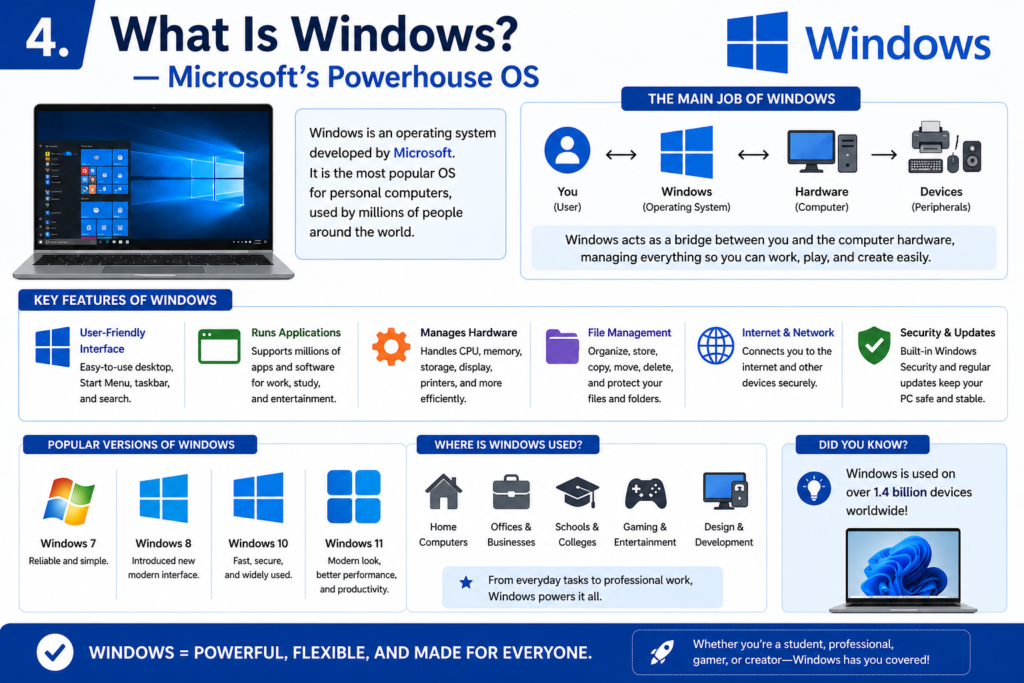
Windows is the operating system created by Microsoft. It was first released in 1985 and has evolved through dozens of versions — Windows XP, Vista, 7, 8, 10, and now Windows 11. Today, Windows runs on more than 70% of all personal computers in the world, making it by far the most widely used desktop operating system on the planet.
Why Is Windows So Popular?
- It runs on thousands of different hardware brands — Dell, HP, Lenovo, Asus, Acer, and more
- It is compatible with almost every piece of software ever made for computers
- It covers every price range — from budget laptops under $200 to professional workstations worth thousands
- It is the standard in businesses, schools, government offices, and enterprises worldwide
- It supports gaming better than any other desktop OS — most games are built for Windows first
| Fun Fact About Windows Windows 11, the latest version, was released in October 2021. It features a centered taskbar, rounded corners, improved performance, and better security features. As of 2025, it is the most advanced version of Windows ever created. |
5. What Is macOS? — Apple’s Premium OS
macOS is the operating system created exclusively by Apple Inc. for its Mac and MacBook computers. Unlike Windows, macOS only runs on Apple hardware — you cannot install it on a Dell or HP laptop. The current version is macOS Sequoia, released in 2024.
Apple designs both the hardware and the software together, which gives macOS a significant advantage in one area: everything is perfectly optimized. The operating system and the computer it runs on are built as a single, unified product — which is why Macs are known for being smooth, stable, and fast even years after purchase.
Why Do People Love macOS?
- Incredibly smooth and fluid user experience — everything feels polished and premium
- Outstanding security — macOS has far fewer viruses and malware threats than Windows
- Perfect integration with iPhone, iPad, Apple Watch, and AirPods
- Industry standard for creative professionals — graphic designers, video editors, musicians
- Apple Silicon chips (M1, M2, M3, M4) deliver exceptional performance and battery life
| The Apple Ecosystem Advantage If you already use an iPhone, a Mac will feel like a natural extension of your life. Features like AirDrop, Handoff, Universal Clipboard, and iMessage on Mac create a seamless experience across all Apple devices that no other ecosystem can match. |
6. Windows vs Mac — The Ultimate Head-to-Head Comparison
This is the part everyone has been waiting for. Now that you understand What is an Operating System, let us put Windows and macOS side by side across every important category:
| Feature | 🪟 Windows | Mac (macOS) |
| Price Range | Budget to High-End ($200–$3000+) | Premium Only ($999–$6000+) |
| Hardware Choice | Thousands of brands and models | Only Apple Mac / MacBook |
| Gaming | Excellent — most games built for Windows | Limited — fewer games available |
| Security | More targeted by viruses | Highly secure, fewer threats |
| Creative Work | Good with right software | Industry standard for creatives |
| Business Use | Dominant in corporate world | Growing in business adoption |
| Ease of Use | Familiar to most users | Intuitive, beginner-friendly |
| Customization | Highly customizable | More restricted and controlled |
| Software Available | Largest software library | Excellent but smaller library |
| Customer Support | Varies by manufacturer | Apple Store — world-class support |
| Virus Risk | Higher risk — use antivirus | Low risk — built-in security |
| iPhone Integration | Limited | Seamless — best in class |
| Performance/Dollar | Better value for money | Premium price, premium performance |
| Updates | Free via Windows Update | Free via System Preferences |
7. Which One Should You Choose? — A Decision Guide
After understanding What is an Operating System and seeing how Windows and Mac compare, the real question is: which one is right for YOU? The answer depends entirely on what you need it for. Here is a simple decision guide:
Choose Windows If You:
- Are on a budget and need a capable computer without spending a fortune
- Play PC games or want access to the largest gaming library
- Work in a corporate or business environment where Windows is the standard
- Need compatibility with the widest range of software and hardware peripherals
- Want full control and customization over your operating system and hardware
- Are a student who needs affordable options for school and college work
Choose Mac If You:
- Already use an iPhone or iPad and want seamless device integration
- Work in creative fields — graphic design, video editing, music production, photography
- Value simplicity, stability, and a premium build quality above all else
- Are concerned about security and want minimal exposure to viruses and malware
- Work in industries where Mac is the professional standard — design studios, media companies
- Want a computer that stays fast and reliable for many years without much maintenance
| ⚠️ Important Reality Check Neither Windows nor Mac is universally better. The best operating system is the one that fits your specific needs, budget, and workflow. A professional video editor and a student gamer will have completely different right answers — and both choices are perfectly valid. |
8. Operating System vs Software — What Is the Difference?
A very common confusion when learning What is an Operating System is mixing up the operating system with regular software. Let us clear this up once and for all:
| Type | Examples | Who Makes It | Can You Remove It? |
| Operating System | Windows, macOS, Linux | Microsoft, Apple, Community | No — it is the foundation |
| System Software | Device drivers, antivirus | Hardware manufacturers | Some can be removed |
| Application Software | Chrome, Word, Photoshop, Spotify | Third-party developers | Yes — freely install/uninstall |
The operating system is the foundation. All other software — whether it is Microsoft Word, Google Chrome, or Spotify — runs on top of the operating system. Without What is an Operating System being answered first, none of your favourite apps could function at all.
9. How Has the Operating System Evolved Over Time?
Understanding What is an Operating System becomes even richer when you see how far operating systems have come over the past 50 years:
| Era | Operating System | Key Feature |
| 1970s | Unix | First multi-user OS for large computers |
| 1981 | MS-DOS | Text commands only — no graphics or mouse |
| 1984 | Apple Macintosh OS | First popular graphical OS for consumers |
| 1985 | Windows 1.0 | Microsoft enters the graphical OS market |
| 1995 | Windows 95 | Start menu introduced — changed computing forever |
| 2001 | Windows XP / Mac OS X | Modern era begins — stable, polished, mass adoption |
| 2007 | iOS (iPhone) | Mobile operating systems become mainstream |
| 2015 | Windows 10 | Free upgrade, unified across PC and tablet |
| 2021 | Windows 11 / macOS Monterey | Modern design, AI features, enhanced security |
| 2024–2025 | Windows 11 / macOS Sequoia | AI integration, Copilot, Apple Intelligence |
From text-only command lines to today’s AI-powered intelligent desktops — the journey of What is an Operating System is one of the most fascinating stories in all of technology. And it is far from over.
10. Operating Systems on Other Devices — Beyond Computers
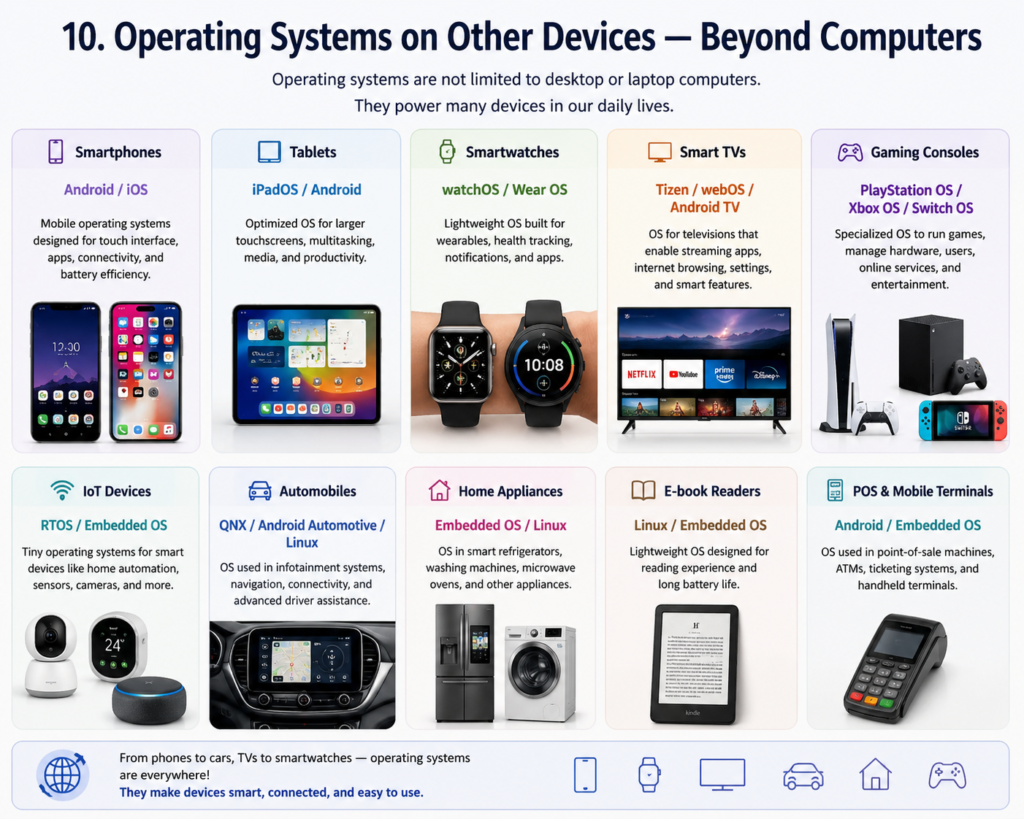
When most people think about What is an Operating System, they think about computers. But operating systems power virtually every digital device in your life:
- Smartphones: Android (Google) and iOS (Apple) are mobile operating systems
- Tablets: iPadOS for Apple, Android for Samsung, Lenovo, and others
- Smart TVs: Tizen (Samsung), webOS (LG), Roku OS, Android TV
- Smartwatches: watchOS (Apple Watch), Wear OS (Google/Samsung)
- Game Consoles: PlayStation OS, Xbox OS, Nintendo Switch OS
- Smart Speakers: Amazon Fire OS, Google’s fuchsia-based systems
- Cars: Android Automotive, Apple CarPlay integration systems
- Servers and Cloud: Linux dominates — powers 90% of the world’s servers
Every screen you interact with runs an operating system. This is exactly why truly understanding What is an Operating System is one of the most universally useful pieces of technology knowledge you can have in 2025.
11. Common Myths About Operating Systems — Busted
There is a lot of misinformation out there about What is an Operating System and the Windows vs Mac debate. Let us bust the most common myths:
| The Myth | The Truth |
| Macs never get viruses | Macs can get malware — they are just less frequently targeted than Windows |
| Windows is only for gaming | Windows is the world’s most used professional business OS |
| Mac is too expensive for normal users | MacBook Air M2 starts around $999 — competitive for its performance level |
| You need to know coding to use Linux | Modern Linux distros like Ubuntu are beginner-friendly with graphical interfaces |
| Older OS versions are fine to keep | Outdated OS versions expose you to serious security vulnerabilities |
| Mac software is limited and inferior | Mac has all major professional tools — Adobe, Microsoft Office, Final Cut Pro and more |
12. The Future of Operating Systems — What Is Coming Next?
The story of What is an Operating System is still being written. Here is what the future holds for Windows, macOS, and beyond:
Artificial Intelligence Integration
Both Windows 11 and macOS Sequoia have already begun embedding AI directly into the operating system. Microsoft Copilot and Apple Intelligence are redefining what an OS can do — writing emails, generating images, summarizing documents, and answering questions — all built into the system itself.
Cloud-Based Operating Systems
The line between local and cloud computing is blurring fast. Chrome OS already lives mostly in the cloud, and both Microsoft and Apple are moving toward hybrid models where your data, apps, and preferences exist everywhere, on every device, simultaneously.
Unified Ecosystems
Apple’s vision of one seamless experience across iPhone, iPad, Mac, and Apple Watch is becoming the new standard. Microsoft is following with deeper integration between Windows, Xbox, and Microsoft 365 across all devices.
| Key Insight for 2025 The future operating system will not just manage your hardware and run your apps. It will understand your preferences, predict your needs, protect your privacy, and work across every device you own — invisibly and intelligently. We are living through the most exciting period in the history of operating systems. |
Quick Summary — Everything You Need to Know
What is an Operating System — here is the complete picture in one place:
| Topic | Key Takeaway |
| What is an OS? | Master software that controls all computer hardware and runs all apps |
| Windows | 72% market share — best for gaming, business, budget buyers, customization |
| macOS | 15% market share — best for creatives, iPhone users, security, premium build |
| Choose Windows if | Gaming, budget, corporate work, maximum software compatibility |
| Choose Mac if | Creative work, iPhone integration, long-term reliability, design quality |
| OS vs Software | OS is the foundation — all apps run on top of it, not the other way around |
| Other devices | Android, iOS, tvOS, watchOS are all operating systems too |
| Future | AI integration, cloud computing, unified cross-device ecosystems |
Conclusion: Now You Know What an Operating System Is
You started this article wondering about What is an Operating System. Now you have the complete answer. An operating system is not just a piece of software — it is the heartbeat of every digital device you own. It is what makes your computer a computer, your phone a phone, and your smart TV smart.
Windows gives you freedom — freedom of choice, freedom of budget, and freedom of customization. macOS gives you quality — quality of experience, quality of security, and quality of ecosystem integration. Neither is wrong. Understanding What is an Operating System means understanding that the right tool depends entirely on the job you need it for.
Whether you choose Windows or Mac, you are now equipped with the knowledge to make that decision confidently and intelligently. Share this guide with anyone who has ever been confused when someone asked them about their operating system — because now, you have the perfect, complete answer to What is an Operating System.
Found this guide helpful? Share it with your friends and leave a comment below. Your questions and thoughts are always welcome! 💻