 vikram@gmail.com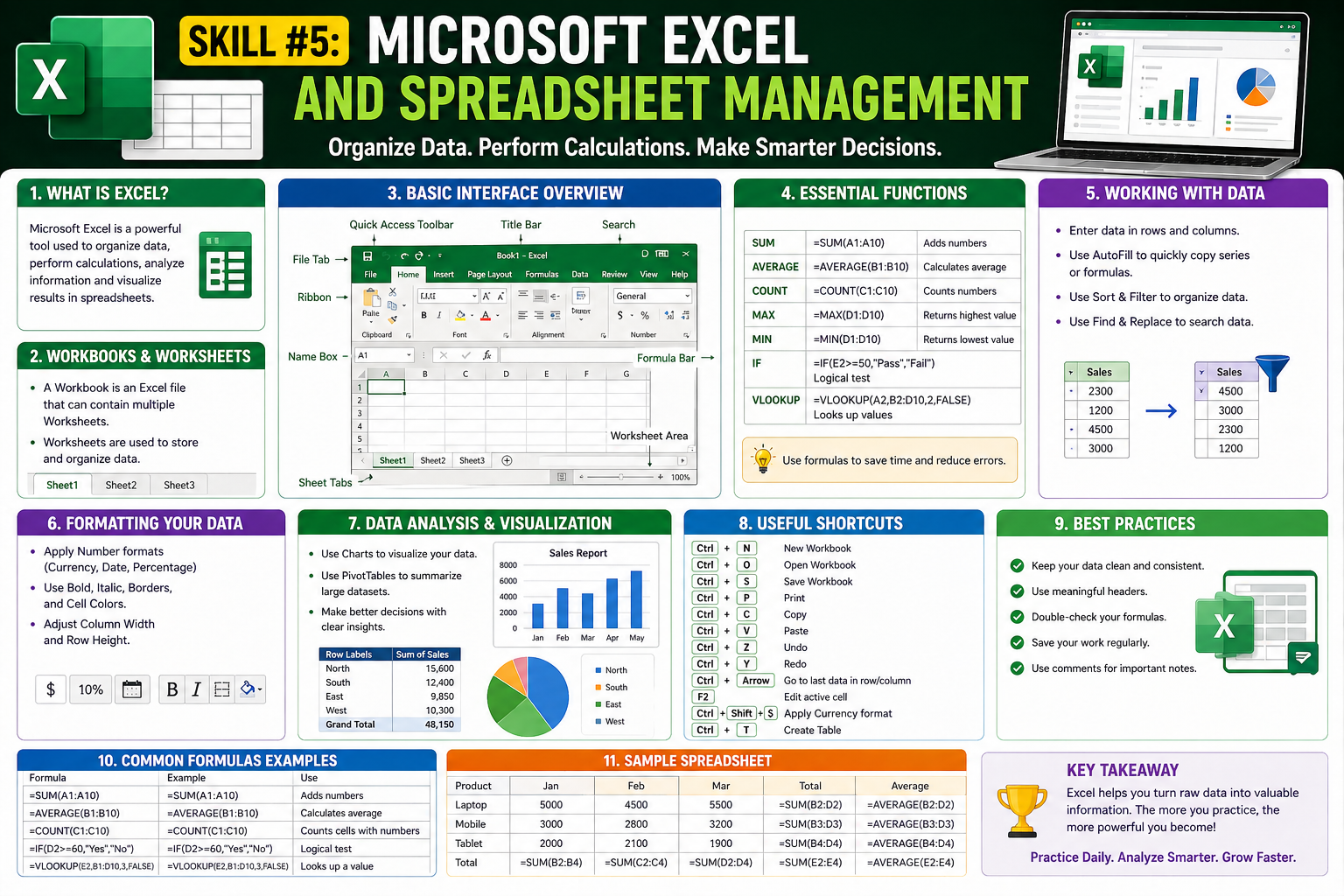
Introduction: Why Learning Computer Skills Is No Longer Optional
We are living in a digital-first world where almost every job, business, and daily task requires basic technology knowledge. Whether you are a student, a job seeker, a homemaker, or a working professional, the Top 10 Computer Skills Every Beginner must learn today are no longer just a bonus on your resume — they are a basic necessity for survival in the modern economy.
Think about it: banks have moved online, schools have gone digital, shopping has shifted to e-commerce, and even governments are offering e-services. If you do not know how to use a computer properly, you are already falling behind. But the good news is that it is never too late to start.
In this detailed guide, we will walk you through the Top 10 Computer Skills Every Beginner must master to stay competitive, employable, and digitally confident. These skills are simple to learn, highly in-demand, and absolutely free or low-cost to develop. Let us get started.
Skill #1: Basic Computer Operations and Navigation
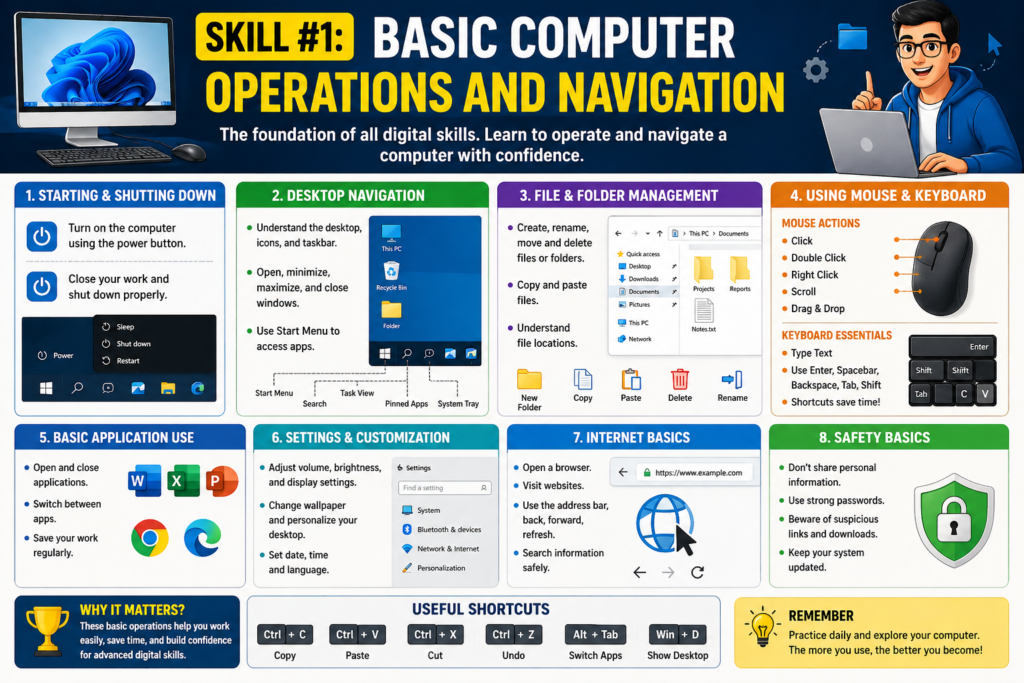
Before anything else, the very first of the Top 10 Computer Skills Every Beginner needs is simply understanding how to use a computer — powering it on and off, using a keyboard and mouse, managing files and folders, and navigating the desktop interface.
This might sound very basic, but millions of first-time users struggle with these fundamental operations. Without mastering the basics, learning anything advanced becomes impossible.
What You Should Learn:
- How to start, restart, and shut down a computer properly
- Understanding the desktop, taskbar, Start menu (Windows) or Dock (Mac)
- Creating, renaming, moving, copying, and deleting files and folders
- Using keyboard shortcuts like Ctrl+C, Ctrl+V, Ctrl+Z, Alt+Tab
- Managing storage: understanding drives, USB sticks, and cloud storage
Recommended free resource: GCFGlobal.org has excellent beginner-level tutorials on basic computer operations that are completely free of cost.
Skill #2: Internet Browsing and Online Safety
The internet is the backbone of the digital world, and knowing how to browse safely and efficiently is the second most important of the Top 10 Computer Skills Every Beginner must have. From searching for information to accessing government portals, everything runs through a web browser today.
However, the internet is also full of risks like scams, viruses, and phishing attacks. That is why online safety is as important as browsing itself.
Key Concepts to Master:
- Using browsers like Chrome, Firefox, Edge, or Safari effectively
- Performing smart Google searches using keywords and filters
- Understanding URLs, HTTPS, and identifying fake or suspicious websites
- Setting up and managing bookmarks and browsing history
- Using Incognito/Private mode when needed
- Recognizing phishing emails and avoiding online scams
- Installing and using an ad blocker for safer browsing
Pro Tip: Always look for the padlock icon (HTTPS) before entering any personal information on a website. This small habit can protect you from major online fraud.
Skill #3: Email Communication and Professional Messaging
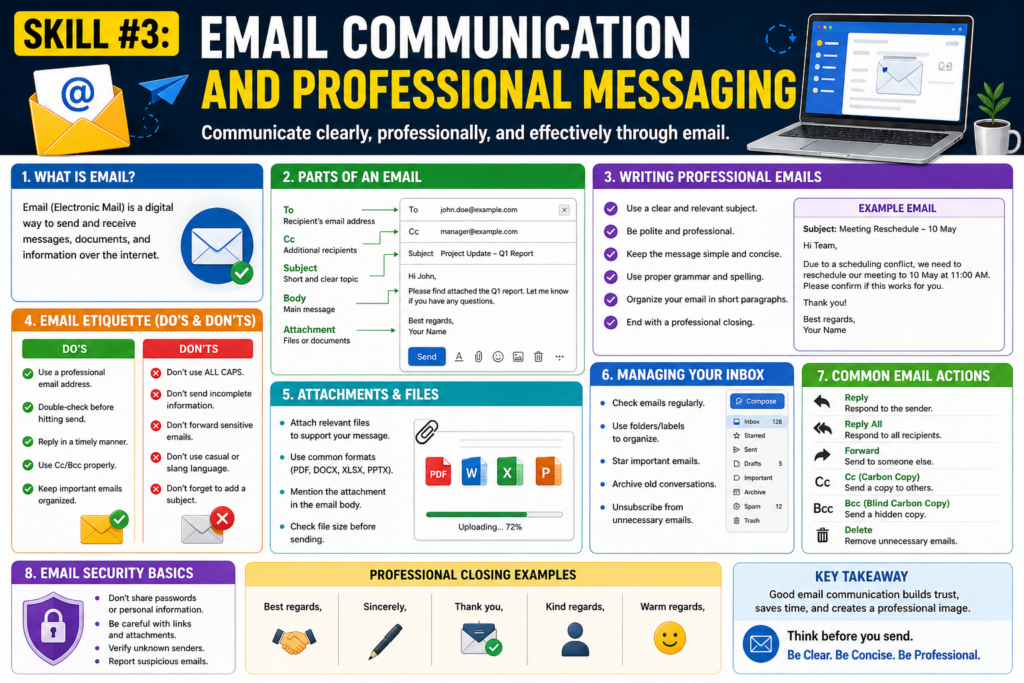
Email remains one of the most powerful communication tools in business and education. Among the Top 10 Computer Skills Every Beginner must develop, professional email communication is a skill that will serve you throughout your entire career.
From job applications to client communication, from academic submissions to government correspondence — email is everywhere. Knowing how to write, send, and manage emails properly can make you look professional and credible.
Email Skills You Need:
- Setting up Gmail, Outlook, or Yahoo Mail accounts
- Writing clear, polite, and professional email messages
- Understanding CC (Carbon Copy) and BCC (Blind Carbon Copy)
- Attaching files, images, and documents correctly
- Organizing your inbox using folders, labels, and filters
- Spotting and avoiding spam and phishing emails
- Using email signatures for professional branding
Many job offers are made and lost based on how well a candidate communicates via email. A poorly written email with spelling mistakes can instantly damage your professional image. Take this skill seriously.
Skill #4: Microsoft Word and Document Processing
Document creation is one of the core Top 10 Computer Skills Every Beginner must learn. Microsoft Word (or Google Docs as a free alternative) is used in virtually every office, school, hospital, and government department worldwide.
Being able to type, format, and edit documents professionally gives you a massive advantage when applying for jobs, preparing reports, or running a small business.
Core Word Processing Skills:
- Typing and basic formatting: bold, italic, underline, font size and style
- Creating and structuring multi-page documents
- Using headers, footers, page numbers, and table of contents
- Inserting tables, images, and hyperlinks
- Track Changes feature for collaborative editing
- Saving in different formats: .docx, .pdf, .txt
- Mail merge for sending personalized bulk letters
Free Alternative: Google Docs is completely free, cloud-based, and works on any device without installation. If you cannot afford Microsoft Word, Google Docs is a perfect replacement.
Skill #5: Microsoft Excel and Spreadsheet Management
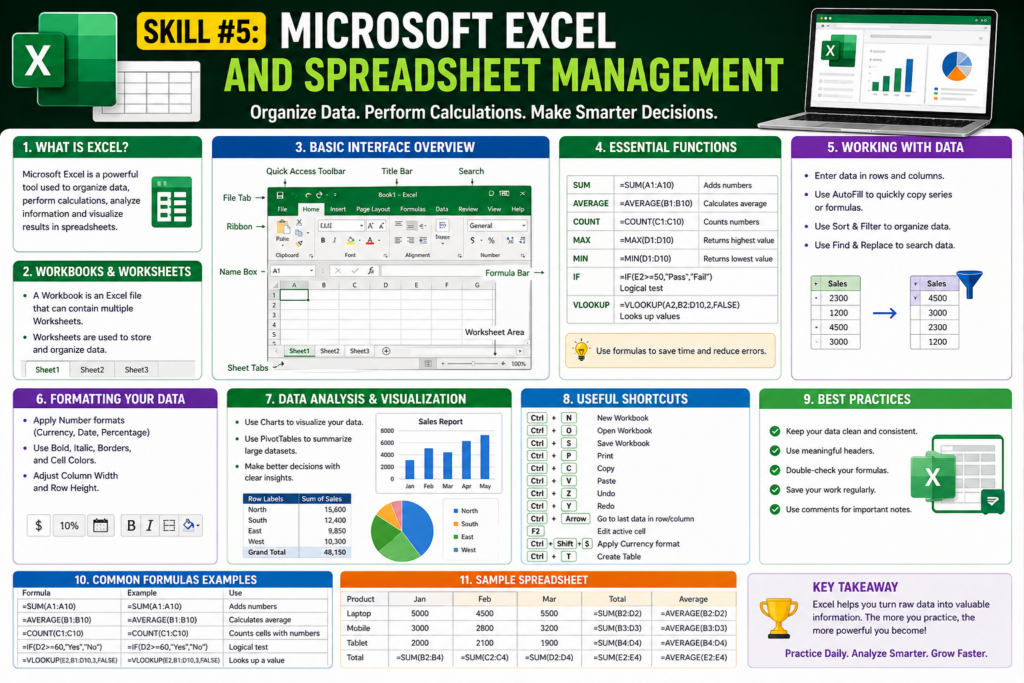
Numbers, data, and analysis are the language of business. That is why spreadsheet skills rank among the most important of the Top 10 Computer Skills Every Beginner should prioritize. Microsoft Excel or Google Sheets is used by accountants, teachers, shopkeepers, data analysts, and managers every single day.
Even a basic understanding of spreadsheets can help you manage household budgets, track business expenses, create student grade sheets, and analyze data with ease.
Essential Excel Skills for Beginners:
- Entering, editing, and formatting data in cells
- Basic formulas: SUM, AVERAGE, MIN, MAX, COUNT
- Sorting and filtering data
- Creating charts and graphs for visual representation
- Using VLOOKUP and IF functions for intermediate tasks
- Freezing rows/columns for easier navigation in large sheets
- Conditional formatting to highlight important data
Did You Know? Microsoft Excel skills are listed in over 70 percent of all office job postings worldwide. Learning even the basics of Excel can dramatically improve your job prospects.
Skill #6: Microsoft PowerPoint and Presentation Skills
Public speaking combined with visual storytelling is a superpower in the modern workplace. Learning PowerPoint or Google Slides is the sixth skill in our Top 10 Computer Skills Every Beginner must acquire. From school presentations to corporate boardroom meetings, presentation software is an essential tool.
PowerPoint Skills to Learn:
- Creating new presentations and choosing professional themes
- Designing clear, visually appealing slide layouts
- Adding text, images, charts, icons, and videos
- Using animations and slide transitions effectively
- Presenter view and speaker notes for confident delivery
- Exporting presentations as PDF or video files
- Collaborating on presentations in real-time using Google Slides
Design Tip: Keep your slides clean and simple. Use the 6×6 rule: no more than 6 bullet points per slide, and no more than 6 words per bullet point. Less clutter means more impact.
Skill #7: Typing Speed and Keyboard Proficiency
This may sound old-fashioned, but fast and accurate typing is genuinely one of the Top 10 Computer Skills Every Beginner must develop. Every other digital skill becomes more powerful when you can type quickly and confidently without looking at the keyboard.
The average professional typist types at 50 to 70 words per minute (WPM). As a beginner, aiming for even 30 WPM with accuracy can save you hours of work time each week.
How to Improve Your Typing:
- Practice daily on free platforms like Typing.com, Keybr.com, or 10FastFingers
- Learn the QWERTY home row technique for touch typing
- Focus on accuracy first, then gradually increase speed
- Master essential keyboard shortcuts for Windows and Mac
- Practice number pad typing for data entry roles
Consistent practice of just 15-20 minutes per day can take your typing speed from 20 WPM to 50 WPM within 2 to 3 months.
Skill #8: Cloud Computing and Online Collaboration Tools
Remote work, online education, and global collaboration have made cloud tools absolutely essential. The eighth skill in our Top 10 Computer Skills Every Beginner must learn involves using cloud platforms like Google Drive, Dropbox, OneDrive, and collaboration tools like Zoom, Microsoft Teams, and Slack.
Understanding cloud storage means you never lose your files, can access them from anywhere, and can collaborate with teammates in real-time — even from different countries.
Cloud and Collaboration Skills:
- Uploading, organizing, and sharing files on Google Drive or OneDrive
- Real-time document collaboration using Google Workspace
- Video conferencing on Zoom, Google Meet, or Microsoft Teams
- Screen sharing and virtual presentation techniques
- Using Slack, Trello, or Asana for project management
- Setting file permissions: view only vs. edit access
- Syncing files between devices for seamless workflow
Cloud computing is no longer just for IT professionals. Today, even small shops, freelancers, students, and homemakers use cloud tools daily to organize their work and life.
Skill #9: Basic Cybersecurity and Data Protection
In an age of constant data breaches and cyber attacks, digital safety has become an essential life skill. Cybersecurity awareness is firmly placed among the Top 10 Computer Skills Every Beginner needs to protect themselves online and in the workplace.
Hackers do not only target large corporations. Individuals and small businesses are increasingly targeted because they often have weaker security practices. Understanding basic cybersecurity can prevent identity theft, financial loss, and data breaches.
Cybersecurity Habits Every Beginner Must Develop:
- Creating strong, unique passwords (minimum 12 characters with symbols)
- Using a password manager like LastPass or Bitwarden
- Enabling Two-Factor Authentication (2FA) on all important accounts
- Keeping operating systems and software updated regularly
- Recognizing phishing emails, fake links, and social engineering
- Using a reputable antivirus and anti-malware solution
- Backing up important data regularly to both local and cloud storage
- Understanding public Wi-Fi risks and using VPN when necessary
Remember: One weak password or one click on a phishing link is all it takes for a hacker to gain access to your entire digital life. Never underestimate the power of good cybersecurity habits.
Skill #10: Basic Troubleshooting and Problem-Solving
The final and often most underrated skill in our Top 10 Computer Skills Every Beginner must have is the ability to troubleshoot and solve common computer problems on your own. You do not need to be a tech expert, but knowing how to identify and fix basic issues can save you time, money, and frustration.
Every computer user — regardless of age or profession — encounters technical problems. The difference between a confident user and a frustrated one is the ability to calmly diagnose and resolve these issues.
Common Troubleshooting Skills:
- Restarting the computer as the first troubleshooting step
- Clearing browser cache and cookies to fix webpage issues
- Checking internet connection issues: router restart, network settings
- Updating or reinstalling drivers for hardware problems
- Using Task Manager (Windows) or Activity Monitor (Mac) to end frozen programs
- Running a disk cleanup and defragmentation for performance optimization
- Using System Restore points to undo problematic changes
- Searching error messages on Google to find solutions independently
Most computer problems have already been faced by millions of other users. A quick Google search of the exact error message will almost always lead you to a reliable solution within minutes.
Bonus: How to Start Learning These Skills Today (Free Resources)
The best part about the Top 10 Computer Skills Every Beginner must learn is that almost all of them can be learned for free using online resources. Here is a quick guide to get started immediately:
- Google Digital Garage — Free courses on digital skills, marketing, and productivity
- Microsoft Learn — Free official training for Word, Excel, PowerPoint, and Teams
- Coursera & edX — University-level computer courses (many free to audit)
- YouTube — Thousands of free, step-by-step tutorial videos on every skill
- Khan Academy — Free programming, data, and computer science courses
- Typing.com — Free touch typing practice with progress tracking
- Cybrary — Free cybersecurity fundamentals for beginners
The key to learning these skills is consistency. You do not need to spend hours every day. Even 30 minutes of daily practice, five days a week, will make you proficient in most of these skills within 3 to 6 months.
Career Impact: Why These Skills Will Transform Your Professional Life
Learning the Top 10 Computer Skills Every Beginner must know is not just about using technology — it is about opening doors to better opportunities, higher salaries, and greater career flexibility.
Studies consistently show that workers with strong digital skills earn 20 to 40 percent more than those without them. In developing economies and rural areas, digital literacy is becoming the single most powerful pathway to upward social and economic mobility.
Consider these real-world scenarios where these skills make a direct difference:
- A student who can create professional presentations gets better grades and stands out during internship interviews
- A small business owner who uses Excel to track inventory saves thousands in accountant fees annually
- A job applicant who writes polished emails and uses cloud collaboration tools is seen as more professional and modern
- A worker who understands cybersecurity protects their company from costly data breaches
- A freelancer with fast typing and document skills completes more work in less time, earning more per hour
These are not theoretical benefits. These are real, measurable improvements in your professional and personal life that begin the moment you start developing these skills.
Conclusion: Start Today, Transform Tomorrow
We have now walked through all the Top 10 Computer Skills Every Beginner must learn in today’s digital world. From basic navigation to cybersecurity, from email communication to cloud collaboration, each of these skills builds upon the other to create a strong, well-rounded digital foundation.
The question is not whether you should learn these skills. The question is: how soon can you start? Every day you delay is a day someone else gets ahead. Every skill you learn today is an investment that pays dividends throughout your entire life and career.
Remember, the goal is not to become a computer programmer or IT expert. The goal is to become a confident, capable digital citizen who can navigate the modern world with ease, security, and professionalism. That transformation begins with learning the Top 10 Computer Skills Every Beginner needs — and it begins right now.
So close this article, open your browser, pick one skill from this list, and take your first step today. Your digital future is waiting.