
 vikram@gmail.com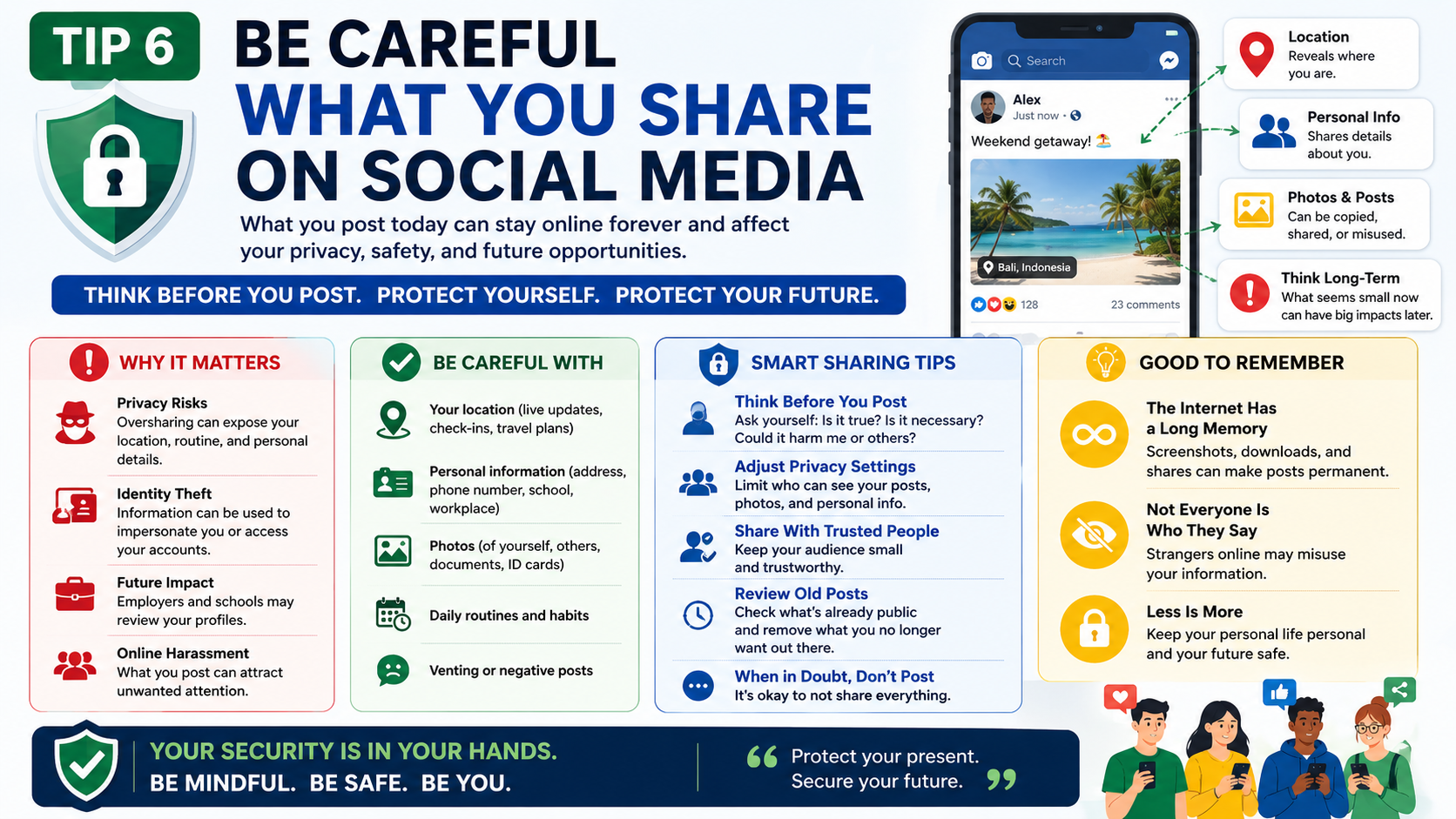
INTERODUCTION:-
The internet is one of the greatest inventions in human history. It connects people across the world, gives access to unlimited information, creates business opportunities, and makes everyday life more convenient in dozens of ways. But like any powerful tool, it comes with real risks — especially for people who are new to using it.
Every single day, thousands of people fall victim to online scams, identity theft, hacking, and cyberbullying. Most of them were not careless people. They simply did not know what to watch out for. That is exactly why understanding online safety tips for beginners is not optional anymore — it is essential.
This guide covers everything a beginner needs to know to stay safe, protected, and confident while using the internet. Whether you use a smartphone, a laptop, or a tablet — these tips apply to you.
Why Online Safety Matters More Than Ever
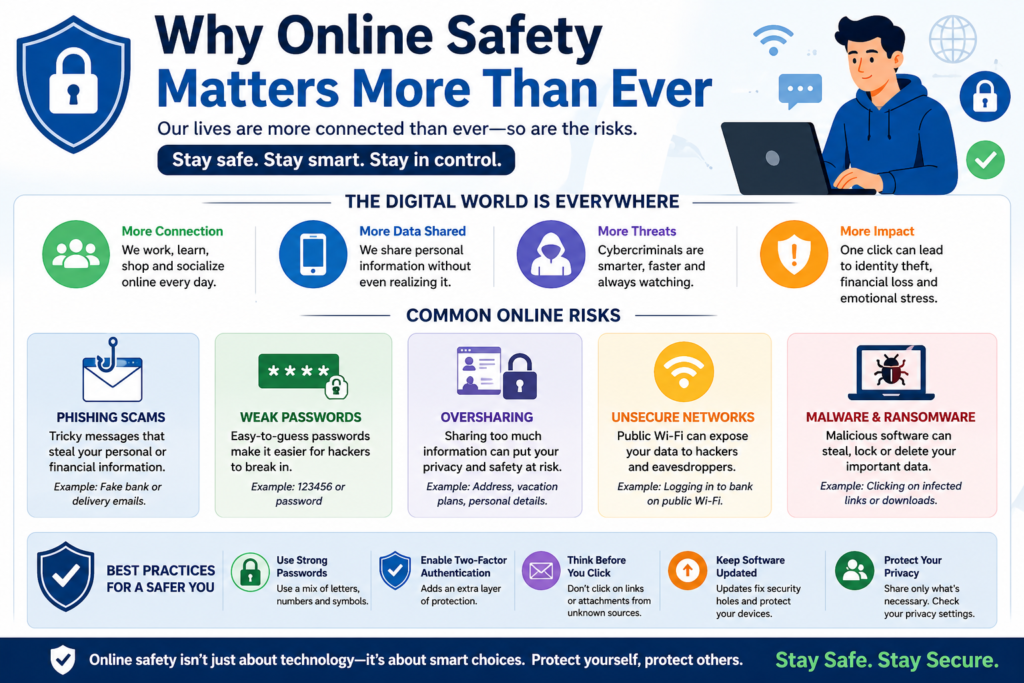
Ten years ago, online threats were mostly limited to spam emails and slow computer viruses. Today, the threat landscape is completely different.
Cybercriminals are more sophisticated. Scams are more convincing. Personal data is more valuable than ever. Social media has created new ways for bad actors to target ordinary people. And with more of our lives happening online — banking, shopping, working, socializing — the consequences of a single mistake can be devastating.
Understanding online safety tips for beginners is the first line of defense against all of these threats. You do not need to be a tech expert to protect yourself. You just need the right knowledge and a few smart habits.
Tip 1 – Create Strong, Unique Passwords for Every Account
If there is one single habit that protects you more than anything else online, it is using strong passwords.
A weak password is like leaving the front door of your house wide open. Hackers use automated tools that can guess millions of common passwords in seconds. If your password is something like “123456,” “password,” or your name followed by your birth year — it will be cracked almost instantly.
Here is what a strong password looks like:
- At least 12 characters long
- A mix of uppercase and lowercase letters
- Numbers included
- Special characters like !, @, #, $
- No personal information like your name, birthday, or pet’s name
Example of a weak password: john1990 Example of a strong password: J@hn#9Kx!2mP
One of the most important online safety tips for beginners is to never use the same password on two different accounts. If one account gets hacked and you reuse passwords, every other account becomes vulnerable instantly.
Use a free password manager like Bitwarden or LastPass to store and generate strong passwords. You only need to remember one master password — the tool handles everything else.
Tip 2 – Turn On Two-Factor Authentication Everywhere
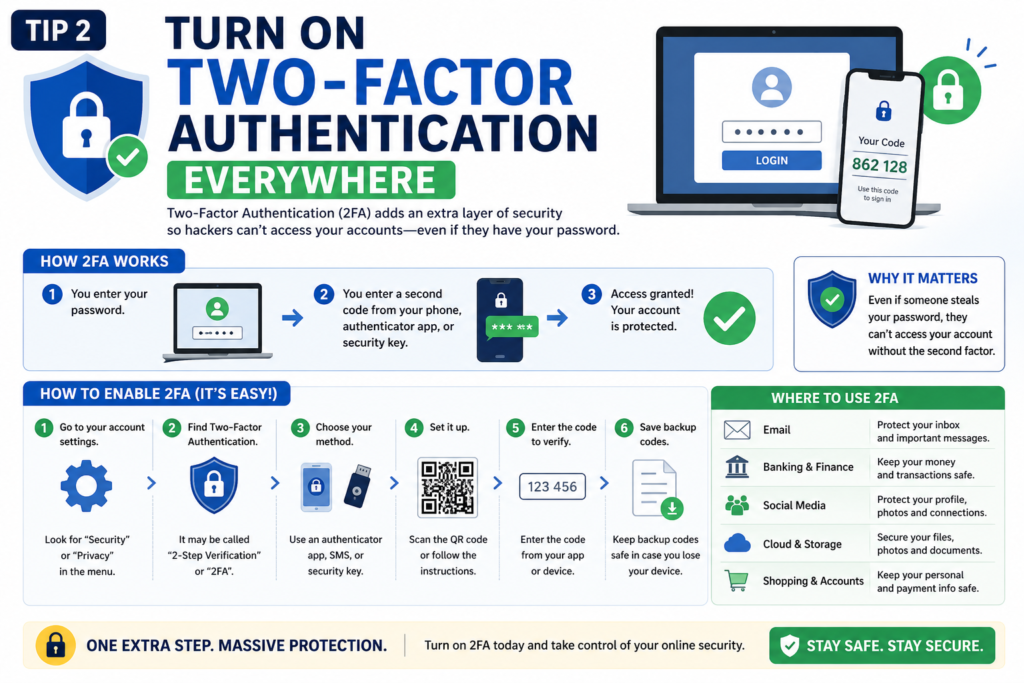
Two-factor authentication — also called 2FA — is one of the most powerful online safety tips for beginners that almost nobody uses when they first start out online.
Here is how it works: instead of just entering your password to log in, you also have to verify your identity a second way — usually through a code sent to your phone or generated by an app. Even if a hacker somehow gets your password, they still cannot get into your account without that second code.
Enable 2FA on:
- Your email account
- Social media accounts
- Banking and payment apps
- Shopping accounts like Amazon
- Any account that stores personal or financial information
Google Authenticator and Authy are free apps that make 2FA simple and quick. Setting this up takes five minutes and could save you from a nightmare. This is one of those online safety tips for beginners that costs nothing and protects everything.
Tip 3 – Learn to Recognize Phishing Scams
Phishing is one of the most common ways people get hacked — and one of the most convincing.
A phishing attack is when a criminal pretends to be a trusted organization — your bank, Google, Amazon, or even a government agency — and tricks you into giving up your login details or personal information. They usually do this through fake emails, fake websites, or fake text messages that look almost identical to the real thing.
Here are the warning signs of a phishing attempt:
- The email address looks slightly wrong (like “support@amaz0n.com” instead of “amazon.com”)
- The message creates urgent panic — “Your account will be closed in 24 hours!”
- There is a link asking you to log in immediately
- The greeting is generic — “Dear Customer” instead of your actual name
- There are spelling errors or strange formatting
One of the most critical online safety tips for beginners is this: never click a link in an email asking you to log in. Instead, open your browser, type the website address yourself, and log in from there. If there is a real issue with your account, you will see it when you log in directly.
Tip 4 – Keep Your Software and Devices Updated
This tip sounds technical but it is actually very simple — and extremely important.
Software updates are not just about adding new features. Most of them include security patches that fix vulnerabilities that hackers have discovered and are actively exploiting. When you ignore an update notification, you are leaving a known hole in your device’s defenses.
Make a habit of:
- Installing operating system updates as soon as they are available (Windows, Android, iOS)
- Keeping your browser updated at all times
- Updating your apps regularly
- Never using software that is no longer supported by the developer
Among all online safety tips for beginners, keeping software updated is one of the easiest to follow — because most devices can be set to update automatically. Turn on automatic updates right now and you will never have to think about it again.
Tip 5 – Use a Secure and Private Internet Connection
Where you connect to the internet matters just as much as what you do while connected.
Public Wi-Fi networks — in coffee shops, airports, hotels, and malls — are convenient but dangerous. These networks are often unsecured, which means anyone on the same network can potentially intercept the data you are sending and receiving. Hackers specifically hang around public Wi-Fi hotspots looking for easy targets.
Here is how to stay safe:
- Avoid doing sensitive tasks on public Wi-Fi — no banking, no shopping, no logging into important accounts
- Use a VPN (Virtual Private Network) — a VPN encrypts your internet connection and hides your activity from snoopers. Free options like ProtonVPN work well for basic use.
- Use your mobile data instead of public Wi-Fi when security matters
- Make sure your home Wi-Fi uses WPA3 or WPA2 encryption — check your router settings
This is one of those online safety tips for beginners that most people only learn after something bad has already happened to them. Do not wait for that lesson.
Tip 6 – Be Careful What You Share on Social Media
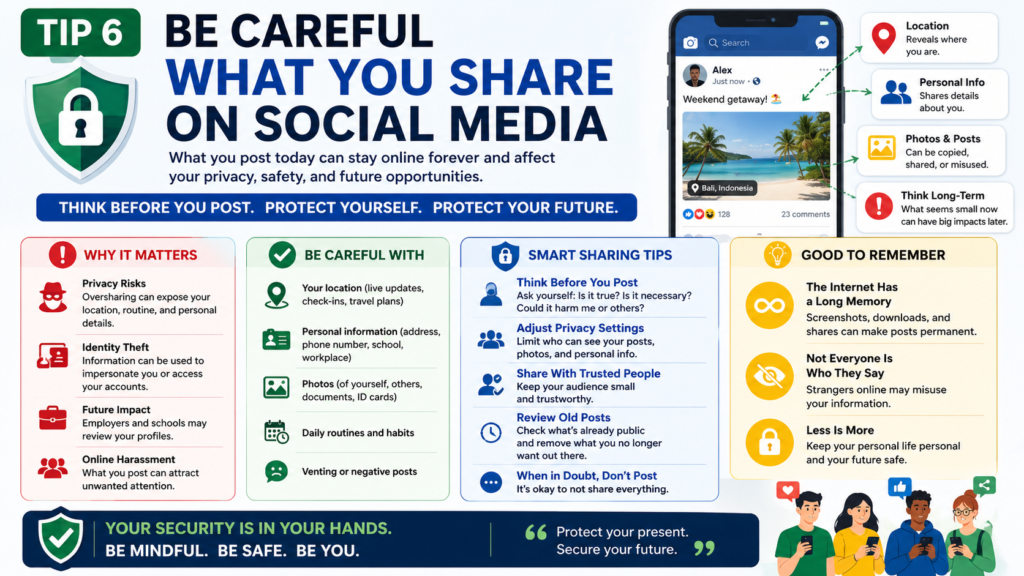
Social media is one of the biggest sources of personal data leaks — and most people hand over that data voluntarily without realizing the risk.
Everything you post publicly on social media can be seen, saved, and used by anyone — including scammers, stalkers, and identity thieves. The more personal information that is available about you online, the easier it is for criminals to target you.
Be careful about sharing:
- Your home address or neighborhood
- Your phone number
- Your daily routine or location in real time
- Photos of your ID, passport, or financial documents
- Information about when your house will be empty
- Your children’s school names or schedules
One of the smartest online safety tips for beginners when it comes to social media is to set your profiles to private and review your friend or follower list regularly. Only connect with people you actually know and trust in real life.
Tip 7 – Download Apps and Files Only From Trusted Sources
Malware — malicious software designed to harm your device or steal your data — most often gets onto devices through downloads.
When you download an app from an unofficial source, crack a paid software for free, or click a suspicious attachment in an email, you are risking installing something dangerous onto your device. Some malware is obvious. Other types run silently in the background for months, logging your keystrokes, stealing your passwords, and sending your personal data to criminals.
Follow these rules as part of your online safety tips for beginners approach to downloads:
- Only download apps from official stores — Google Play Store, Apple App Store, or the official developer’s website
- Never download cracked or pirated software
- Do not open email attachments from people you do not know
- Scan downloaded files with antivirus software before opening them
- If a website is aggressively asking you to download something you did not request — leave immediately
Tip 8 – Install a Reliable Antivirus Program
Antivirus software is your device’s immune system. It scans files, monitors behavior, and blocks threats before they can do damage.
Many people think antivirus is unnecessary if they are “careful online.” That thinking is outdated. Even careful, experienced users can encounter threats on legitimate websites through what are called drive-by downloads or malicious ads. An antivirus program catches what your eyes miss.
Good free options include:
- Windows Defender — built into Windows 10 and 11, surprisingly capable
- Malwarebytes — excellent for scanning and removing existing threats
- Avast Free Antivirus — solid real-time protection for beginners
Installing antivirus is one of those foundational online safety tips for beginners that creates a safety net for everything else you do online.
Tip 9 – Protect Your Children Online
If you have children who use the internet, their online safety is your responsibility — at least until they are old enough to understand the risks themselves.
Children are particularly vulnerable online because they are naturally trusting, curious, and less experienced at recognizing manipulation. Predators, scammers, and inappropriate content are all real threats that every parent needs to address proactively.
Practical steps:
- Use parental control software to filter inappropriate content
- Keep devices in shared family spaces, not in children’s bedrooms
- Have open, honest conversations about online dangers without creating fear
- Teach children never to share personal information with strangers online
- Monitor who they are talking to on games and social media
- Set screen time limits to reduce exposure and encourage balance
Teaching your children online safety tips for beginners from an early age is one of the most valuable things you can do for their long-term wellbeing.
Tip 10 – Back Up Your Important Data Regularly
Imagine losing every photo, document, and file you have ever saved — because of a ransomware attack, a crashed hard drive, or a stolen device.
It happens to thousands of people every week. And in most cases, it was completely preventable.
Regular data backups mean that even if the worst happens, you can recover everything. Here is a simple backup strategy:
- Cloud backup: Use Google Drive, iCloud, or OneDrive to automatically back up photos and documents
- External hard drive: Keep a physical copy of critical files updated monthly
- Email important documents to yourself as a quick, simple backup for things like IDs or certificates
This is one of the most practical online safety tips for beginners because it protects you not just from hackers, but from accidents, hardware failures, and natural disasters too.
Tip 11 – Watch Out for Online Scams
Online scams come in dozens of forms, and they are getting more convincing every year. Some of the most common ones that trap beginners include:
The “You’ve Won a Prize” Scam — You receive a message saying you have won a lottery or competition you never entered. To claim your prize, you need to pay a small fee or provide your bank details. There is no prize.
The Romance Scam — Someone online builds a relationship with you over weeks or months, then suddenly has an emergency and needs money urgently.
The Tech Support Scam — A pop-up or phone call claims your computer has a virus and you need to call a number or allow remote access to fix it.
The Job Offer Scam — A too-good-to-be-true job offer that asks for your personal details or a payment upfront before you can start.
The golden rule among online safety tips for beginners when it comes to scams: if something sounds too good to be true, it is. No legitimate company, government, or organization will ever ask you to pay money to receive a prize or a job.
Tip 12 – Log Out of Accounts on Shared Devices
This tip is simple but regularly overlooked.
If you use a shared computer — at a library, an internet cafe, a friend’s house, or a shared family device — always log out of your accounts when you are done. Staying logged in means the next person to use that device has instant access to your email, social media, and any other account you forgot to close.
Make it a habit to:
- Log out of every account before leaving a shared device
- Never save passwords on browsers you do not own
- Clear the browser history and cookies after use
- Never check banking or sensitive accounts on shared devices at all if possible
Among all the online safety tips for beginners in this guide, this one requires zero technical knowledge — just awareness and a thirty-second habit.
Building Your Personal Online Safety Routine
Knowing these tips is the first step. Turning them into daily habits is what actually keeps you safe.
Here is a simple weekly checklist to keep your online life secure:
| Task | Frequency |
|---|---|
| Check for software/app updates | Weekly |
| Review which apps have account access | Monthly |
| Back up important files | Weekly |
| Review privacy settings on social media | Monthly |
| Run antivirus scan | Weekly |
| Check for suspicious account activity | Weekly |
Start with just two or three of these. Add more as they become automatic. Over time, practicing online safety tips for beginners will feel as natural as locking the door when you leave the house.
Final Thoughts
The internet is not going anywhere — and neither are the people who want to take advantage of those who do not know how to protect themselves. But here is the truth: staying safe online is not complicated. It does not require advanced technical skills or expensive software.
It requires awareness, a few smart habits, and the willingness to take your digital safety as seriously as your physical safety.
Every tip in this guide is something you can start using today. Strong passwords. Two-factor authentication. Careful social media habits. Updated software. Trusted downloads. A good antivirus. Regular backups.
These are the real online safety tips for beginners — practical, proven, and powerful enough to protect you from the vast majority of online threats.
Start with one tip today. Add another next week. Build your habits gradually. Because in the digital world, the safest people are not the luckiest ones — they are simply the most prepared.
Stay smart. Stay safe. Stay protected.
If you are new to using the internet, you should also read our complete guide on basic computer skills to understand the fundamentals better.
“For more information, you can visit the official website of Google.”